
Payment Plan Reports
Payment Plans Dashboard Overview
The Payment Plans tab gives your firm one place to see every payment plan — who’s paying down a balance, who’s falling behind, and which plans need a human follow-up. Use it alongside the Payments tab when you need installment-level or failure detail.
Where to Find It
From the left navigation:
Transactions → Payment Plans
That opens the full table of client payment plans for your firm.
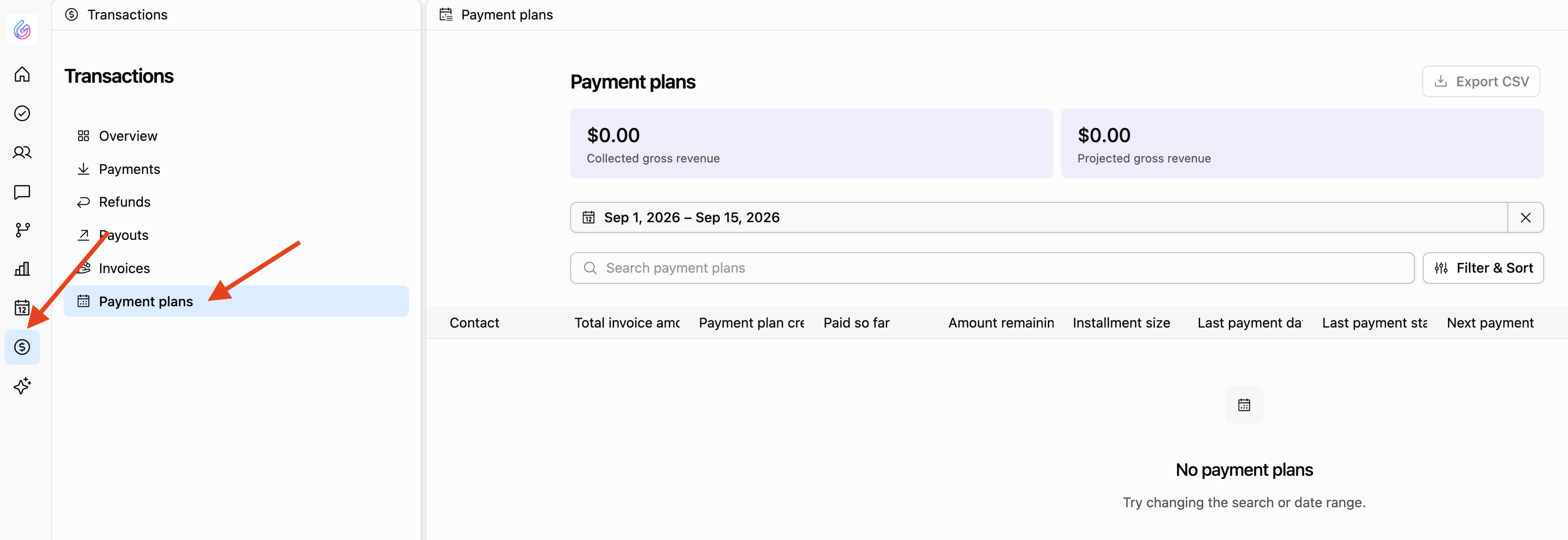
Understanding the Payment Plans Table
Each row is a snapshot of one client’s plan. The columns you’ll use most often:
• Contact
The client on the plan.
• Total Invoice Amount
The full invoice amount the plan is covering.
• Payment Plan Created
When the plan was created.
• Paid So Far
How much has been collected on the plan so far.
• Amount Remaining
The balance still owed on the plan (plan balance).
• Installment Size
The amount charged each cycle.
• Last Payment Date
When the most recent installment was attempted.
• Last Payment Status
Outcome of that last attempt, typically:
Successful
Pending
Failed
Refunded
When the last payment Failed, Glade may also show a short failure reason from the processor (for example, insufficient funds). Use that with the Health column to decide who needs outreach. For more installment-level detail, open Transactions → Payments and filter to Failed (see Payment Reports).
• Next Payment Date
When the next installment is scheduled to run.
• Payment Frequency
How often installments run — weekly, biweekly, monthly, or bimonthly (same options as when you set up a plan).
• Remaining Payments
How many installments are left.
• Workflow
Which case / workflow the plan is tied to.
• Payment Plan Status
Whether the plan itself is Active, Completed, or Canceled.
Payment Plan Health
The Health column is the fastest way to see which plans need attention — beyond a single failed attempt.
Health states include:
• Current
Installments have been running successfully and on schedule.
• Retrying
An installment failed and Glade is retrying it.
• Overdue
An installment exhausted its retries. The missed amount is typically added to the end of the plan so the client still owes it later.
• Blocked
Two or more installments have failed all retry attempts. Treat this as a stagnating plan that needs immediate follow-up (updated payment method, outreach, or plan changes).
Sort or scan by Health first when you’re doing collections triage.
Why the Payment Plans Dashboard Matters
This view helps your firm:
Track ongoing payment-plan revenue and remaining balances
Spot at-risk, retrying, overdue, or blocked plans quickly
See last payment status (and failure reason when available) before you call the client
Monitor how many installments remain
Keep cash flow predictable across the practice
Related
Setting up a payment plan — create installment amount, frequency, start date, and payment method
Payment Reports — firm-wide payments table, failed payments, CSV export
QuickBooks Integration — how payment-plan installments sync when QBO is connected