
Chat With Glade Support (2.0)
Using the Chat Widget in Glade 2.0
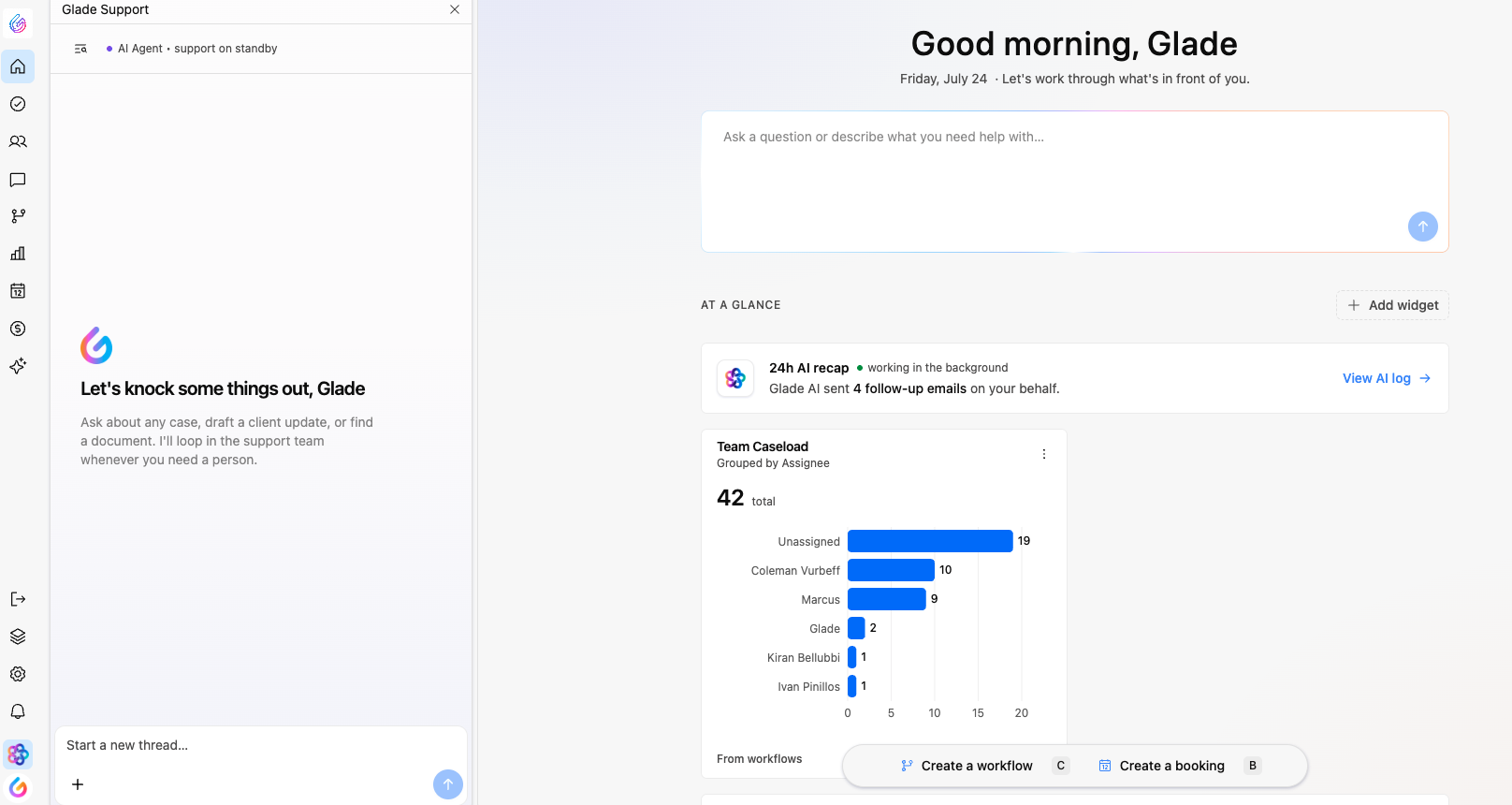
The chat widget is your direct line to Glade support, built right into Glade 2.0. From anywhere in the platform you can open it, ask a question, and get help without leaving the page you're working on.
When you send a message, G, Glade's AI assistant, answers first. G can see your workspace's real data (your cases, filings, documents, invoices, and calendar) as well as the Glade help center, so it can answer most questions on the spot and take routine actions for you. If G can't resolve something, or you'd rather talk to a person, it hands the conversation to a member of the Glade team, who picks up with the full thread in front of them.
The widget also keeps a history of your past conversations and gives you one-click access to the Glade AI Help Center, so all of your support resources live in one place.
📺 Watch the full walkthrough (1 min)
Opening the chat widget
There are two ways to open Glade chat support, and both bring up the exact same window. Use whichever is more convenient at the moment.
The first is the chat icon in the lower left-hand corner of the screen. Click it and the Glade chat support window pops up. ▶️ See it in the video (0:10)
The second is a keyboard shortcut. Press the G key on your keyboard and the same chat support window opens instantly. This is the fastest option. ▶️ See it in the video (0:20)
Asking G a question
Once the widget is open, type your message directly into the chat and send it. G replies in real time and shows you what it's checking as it works, so you can see which part of your workspace it's looking at. Because the widget floats over your current screen, you can keep working while G answers.
G works best when you give it the specifics you'd give a colleague: the client's name, the case, and what you're trying to do. A few examples of what you can ask:
How-to questions: "How do I add a supporting PDF to the petition?" G answers from the Glade help center.
What's going on with a case: "Is [client name]'s filing packet ready? What's blocking pre-filing review?" or "What's still unanswered on [client name]'s questionnaire?"
Court and calendar: "What hearings do I have next week?"
Billing: "Which clients have unpaid invoices?"
Routine actions: "Reschedule [client name]'s consultation to Tuesday afternoon," "Resend [client name]'s portal invite," "Re-run the signing step on [client name]'s case," "Refund [client name]'s last payment," or "Add a task to follow up on missing paystubs, due Friday."
G confirms what it did after taking an action, and every action shows up in the case like any other change.
To stop G mid-reply, click the Stop button that replaces Send while G is answering. Anything G has already written stays in the thread.
Getting a person from the Glade team
If G can't solve your problem, or you'd simply rather talk to someone, say so: "Please bring in the Glade team." G escalates the conversation with everything discussed so far, so you never have to repeat yourself. A member of the Glade team replies in the same thread. You can keep working in the meantime, and the widget will show the reply when it arrives.
Picking up where you left off
Close the widget and reopen it, and your active conversation is right where you left it: for 30 minutes after G's last reply, or for 8 hours once a Glade team member is involved. After that, the widget starts a fresh conversation, and the old one moves to your history.
Viewing your prior conversations
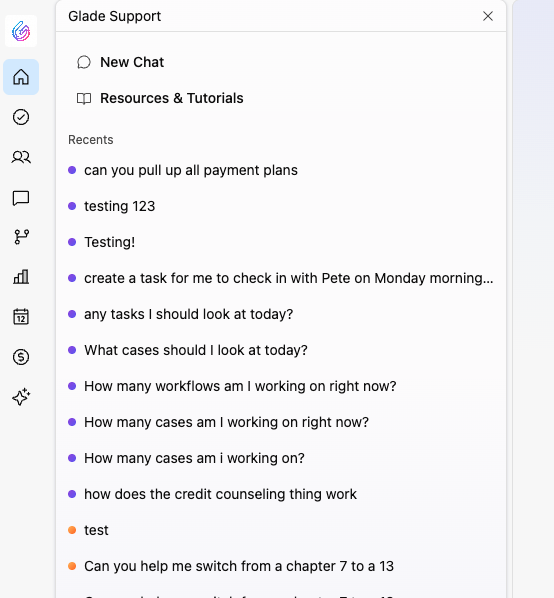
Every conversation you've had with chat support is saved so you can refer back to it later. To find your history, click the conversations icon within the widget. You'll see a list of your past conversations, with the most recent at the top. Scroll down to load older ones. Click any conversation to reopen it and read through what was discussed. When you're done, you can head back and start a new chat from the same view. ▶️ See it in the video (0:45)
Opening the Glade AI Help Center
The widget also includes a Resources and Tutorials button that takes you straight to the Glade AI Help Center. There you'll find help articles organized by the order in which you'd file a case, so the guidance follows your natural workflow from start to finish. ▶️ See it in the video (0:52)
Using G's knowledge outside Glade
Prefer to work in Claude, ChatGPT, or another AI assistant? The same data and actions G uses are available to any MCP-compatible client. See Connecting to Glade via MCP.
Quick reference
I want to... | Do this |
|---|---|
Open chat support | Click the icon in the lower left corner, or press G on your keyboard |
Ask G a question or have it take an action | Open the widget, type your message with the client and case, and send |
Stop G mid-reply | Click Stop where the Send button was |
Talk to a person on the Glade team | Ask G to bring in the Glade team; they reply in the same thread |
Review a past conversation | Click the conversations icon, then select a prior conversation (most recent is at the top) |
Start a new chat | Return to the main chat view after opening your history |
Browse help articles | Click Resources and Tutorials to open the Glade AI Help Center |