
How to Add Income Organizer for Debtor 2 (Non-Filing Spouse)
Overview
When a case involves a non-filing spouse whose income needs to be included in the Means Test, you'll need to add a second Pay Organizer step to the workflow. This allows the system to capture Debtor 2's income information separately.
When to Use This
Use this feature when:
The debtor is married but filing individually
The non-filing spouse's income must be included on the Means Test (Form 122A-1 or 122C-1)
The client needs to enter income data for Debtor 2 through the Income Organizer
Step-by-Step Instructions
Step 1: Navigate to the Workflow
Open the case in Glade
Go to the Workflows section from the left sidebar
Select the appropriate case/matter from the workflow list
Step 2: Access the Action Menu
Locate the workflow task list for the case
Find the Action Button — this appears as a circle with three dots (⋯)
Click on the action button to open the menu
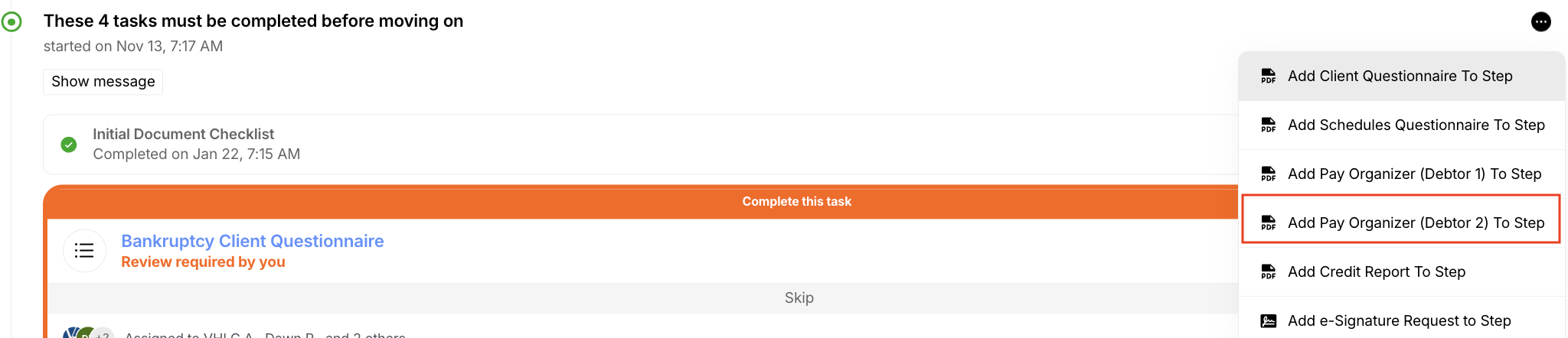
Step 3: Add the Pay Organizer Step
In the action menu, look for "Next Steps" or step options
Select "Add Pay Organizer Data To" (this may appear as "Add Pay Organizer (Debtor 2)")
Click on this option to add the second income organizer step to the workflow
Step 4: Verify the Step Was Added
After adding, you should see:
A new task in the workflow for Debtor 2's income organizer
The task will be highlighted (typically in orange/red) indicating it's pending
The client will now be able to submit income data for the non-filing spouse