
Household Size on the Means Test (122A-1 and 122C-1)
Household size on Form 122A-1 (Chapter 7, line 13) and Form 122C-1 (Chapter 13, line 16b) decides which median family income your client is compared against. A wrong household size can flip the above- or below-median result. Glade calculates household size on both forms and locks the field. To add people Schedule J doesn't count, both forms have an optional field: "Additional household members not counted on Schedule J."
Where household size comes from
Household size is the total of:
The debtor: always 1.
The spouse, when they count. Both forms use the same rule, but each form's on-screen note words it differently. On 122A-1 it says "2 if married and living together, otherwise 1" (from Form 122A-1 #1). On 122C-1 it says 1 for a spouse filing jointly, or for a non-filing spouse in the same household (Form 107: Married, Not Separated). A spouse who is separated or living apart isn't added. This is the same rule that controls whether Column B (spouse income) appears.
Schedule J dependents who live with the debtor (Schedule J, question 2). Only dependents marked as living with the debtor are counted.
Additional household members not counted on Schedule J: the optional number you enter. Blank or 0 adds nothing.
Marital and filing status come from Schedule I and Form 107, question 1 (see Marital Status Autofill in the Schedules).
The household size field shows a lock icon and is labeled Populated by conditional autofill. To change it, change what feeds it. The median (labeled Populated from median income dataset) updates with the new household size, and so does line 5 on Form 122A-2 or 122C-2. Review the long form after a change. On 122A-1, the household size check against Schedule J includes the new field, so using it won't trigger a mismatch warning.
Where to find it on each form
The walkthrough below uses 122C-1, but the field works the same way on both forms.
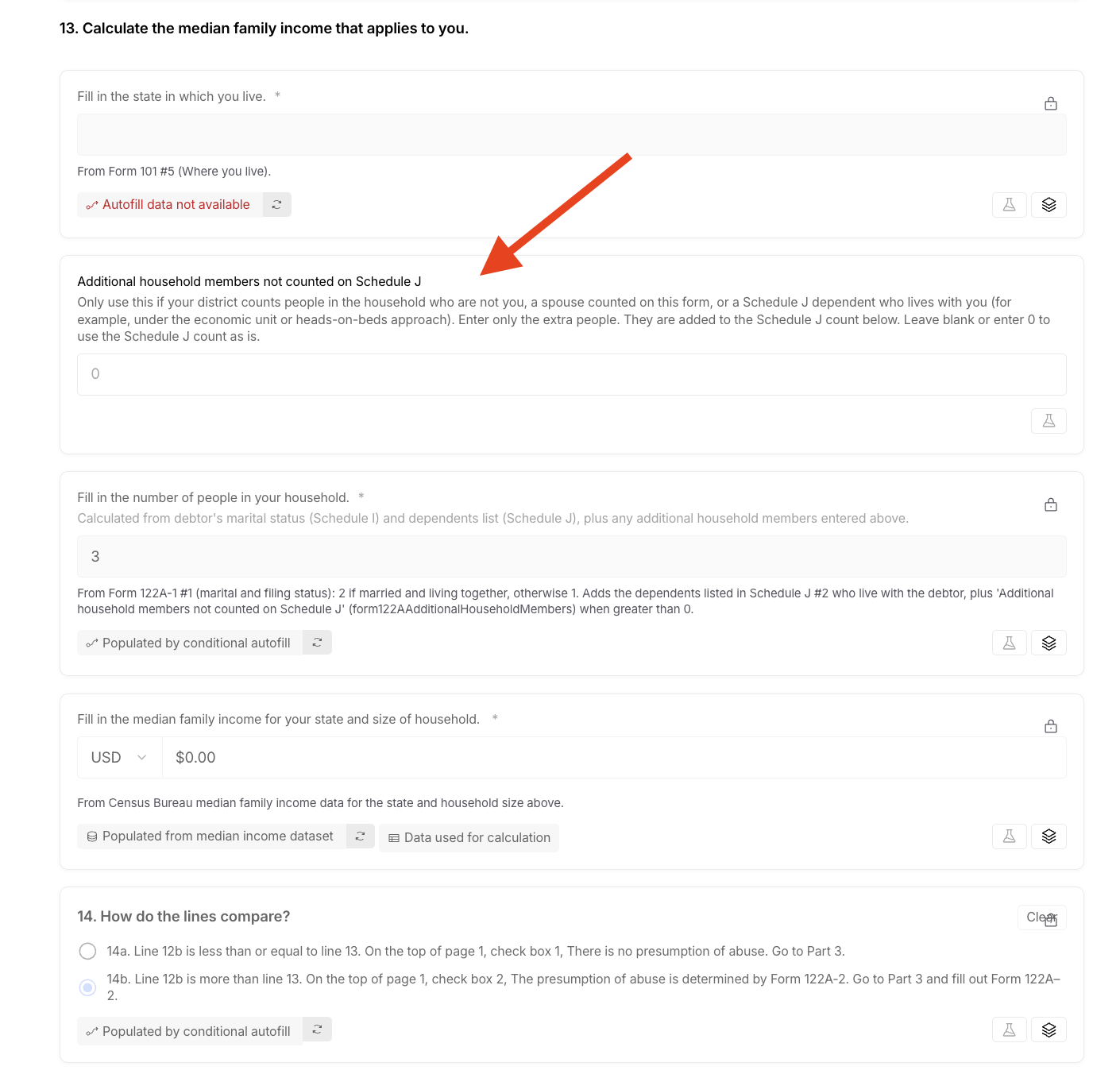
122A-1 (Chapter 7): question 13, Calculate the median family income that applies to you. The fields aren't lettered. In order: Fill in the state in which you live. (from Form 101 #5), the new field, Fill in the number of people in your household., then Fill in the median family income for your state and size of household. The median feeds question 14, How do the lines compare? If line 12b is at or below line 13 (14a), there's no presumption of abuse. If it's above (14b), the presumption is determined by Form 122A-2.
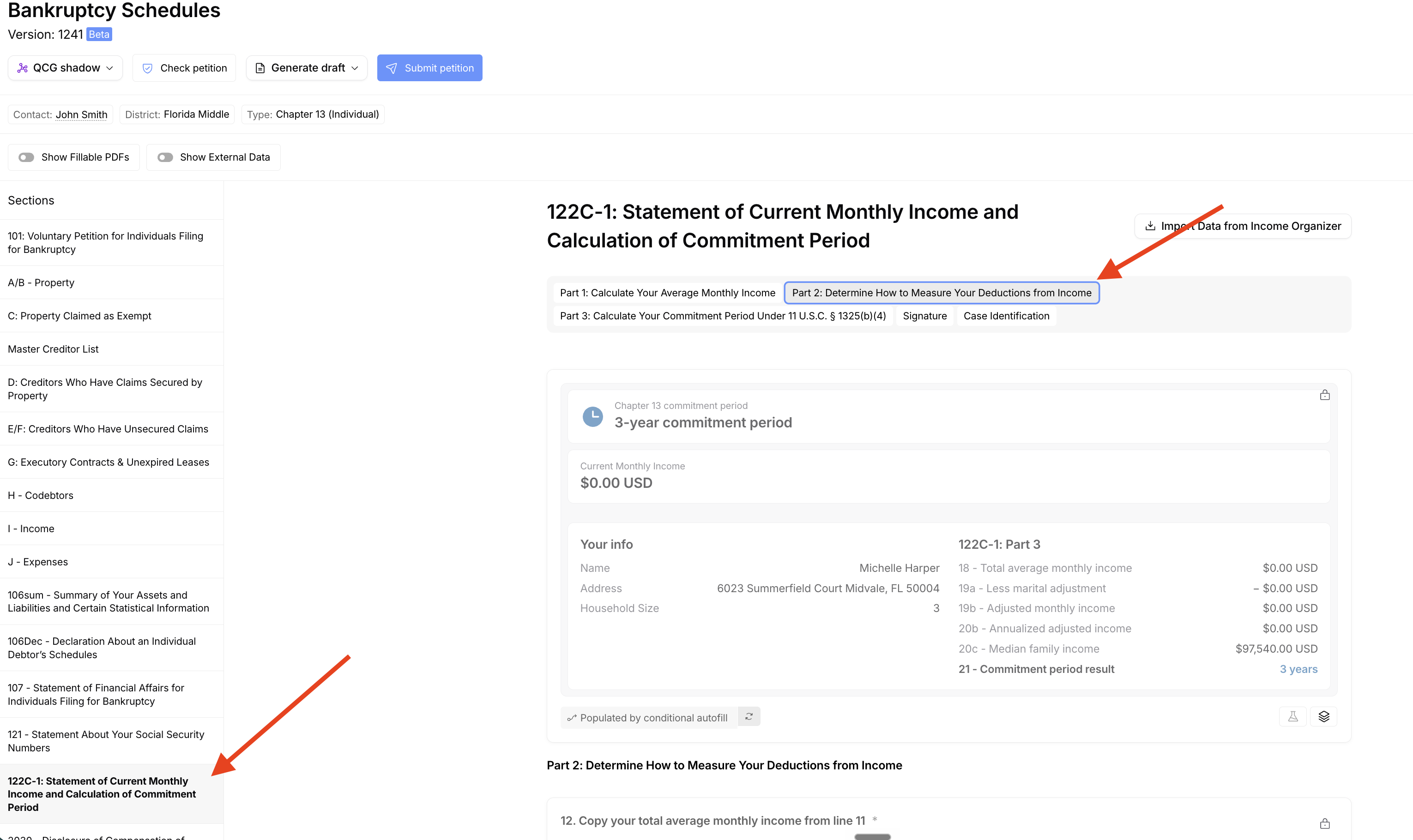
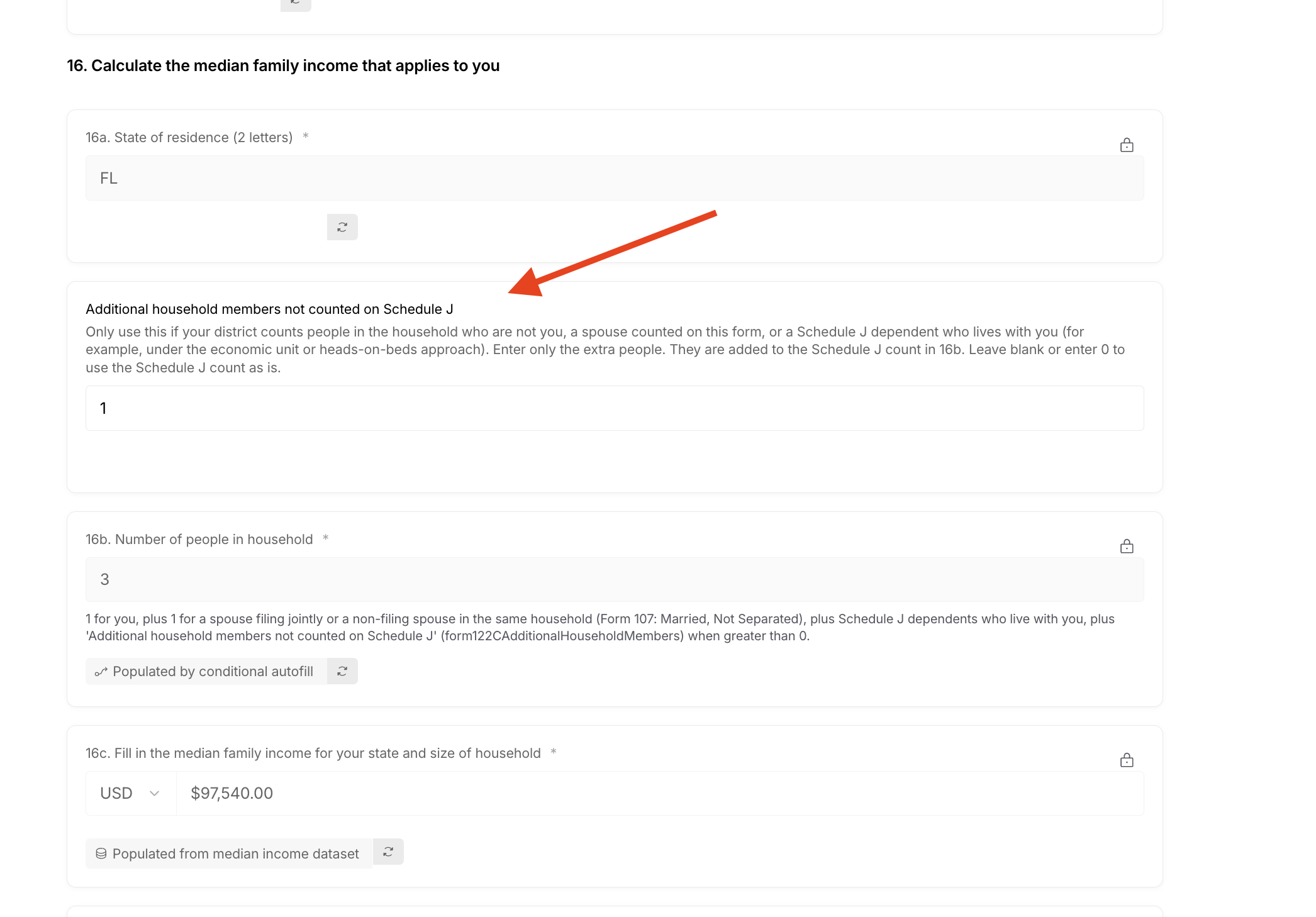
122C-1 (Chapter 13): question 16, Calculate the median family income that applies to you, on the Part 2: Determine How to Measure Your Deductions from Income tab. In order: 16a. State of residence (2 letters), the new field, 16b. Number of people in household, then 16c. Fill in the median family income for your state and size of household. The median feeds the commitment period. The summary card at the top of Part 2 shows the Household Size, the median and the commitment period result. The full comparison is in Part 3.
When to use the field
The Bankruptcy Code doesn't define "household," and courts measure it in different ways. Some count only people who could be claimed as dependents for tax purposes. Under an economic unit or heads-on-beds approach, the household can be larger than the dependents on Schedule J. Which approach applies is an attorney decision. Use the field for:
People who aren't listed as dependents on Schedule J, such as an adult child, a grandchild, or an elderly parent the debtors support.
Schedule J dependents who don't live with the debtor but belong in the household. Keep them on Schedule J as usual. They aren't counted automatically, so add them here.
Don't use the field for:
dependents already counted (those marked as living with the debtor);
a spouse (fix marital and filing status instead);
lowering household size. The field only adds people, so fix the source answers instead.
Don't list people as Schedule J dependents just to raise the number. Entering people in this field doesn't change Schedule J. If the household is larger than the dependent list, be ready to explain to the trustee or court how you counted it.
How to add household members
Open the case's Bankruptcy Schedules and check the source answers:
marital and filing status in I - Income and 107 - Statement of Financial Affairs for Individuals Filing for Bankruptcy (question 1);
dependents in J - Expenses (question 2), including whether each one lives with the debtor.
Note any dependent who doesn't live with the debtor but belongs in the household. You'll add them in step 3.
Go to the household size question:
122C-1: in the Sections sidebar, click 122C-1: Statement of Current Monthly Income and Calculation of Commitment Period. Open the Part 2: Determine How to Measure Your Deductions from Income tab and scroll to question 16.
122A-1: in the Sections sidebar, open the 122A-1 section and scroll to question 13.
Find Additional household members not counted on Schedule J, just above the locked household size:
122C-1: between 16a and 16b.
122A-1: between Fill in the state in which you live. and Fill in the number of people in your household.
Enter only the number of extra people, not the total household size.
Confirm that household size and the median updated. On 122C-1, the summary card shows the new Household Size. On 122A-1, check question 14. Then run Check petition.
Example: Joint debtors have one Schedule J dependent living with them, so Glade counts 2 debtors + 1 dependent = 3. They also support their daughter, her daughter, and an elderly parent in the home, none of them listed as dependents. Enter 3, and household size becomes 6.
FAQ
Q: I changed household size in the Income Organizer's Means Test Calculator, but the form didn't change. Why?
A: That field doesn't sync to 122A-1 or 122C-1. Only the income figures do. Use the new field on the means test form.
Q: I don't see the new field on my case.
A: It was added in Bankruptcy Schedules version 1241 (October 8, 2026), and new cases get it. Check the version under the Bankruptcy Schedules title at the top of the page. If an existing case is on an earlier version, contact Glade Support to have it updated.
Q: Household size still looks wrong. What should I check?
A: Check marital and filing status (including whether the spouse lives in the same household), whether each Schedule J dependent is marked as living with the debtor, and the new field. If it still looks off, contact Glade Support with the workflow link.