
The Long-Form Means Test in the Income Organizer
Glade's Income Organizer now fills the deduction lines of the long-form means test — Form 122A-2 (Chapter 7) and Form 122C-2 (Chapter 13) — straight from your client's paystubs, so you no longer have to hand-enter taxes, insurance, court-ordered payments, and other payroll deductions.
📹 Watch the walkthrough:
Overview
The long-form means test is the detailed expense-and-deduction side of the means test that above-median filers must complete. Historically every deduction line was typed in by hand, even when the amount was already sitting on the client's paystub.
Now, when the Income Organizer runs, Glade reads the payroll deductions off the uploaded paystubs, converts them to monthly amounts, and populates the lines it can support on 122A-2 and 122C-2. You stay in control — Glade fills what it can defend from the paystub and leaves the rest for you to complete and confirm.
How it works
Collect the client's paystubs in the Income Organizer. The calculation runs on the paystubs already gathered for the case.
Let Glade recalculate. On each recalc, Glade produces the long-form means test outputs at the household level (the filing debtor plus a non-filing spouse, where there is one).
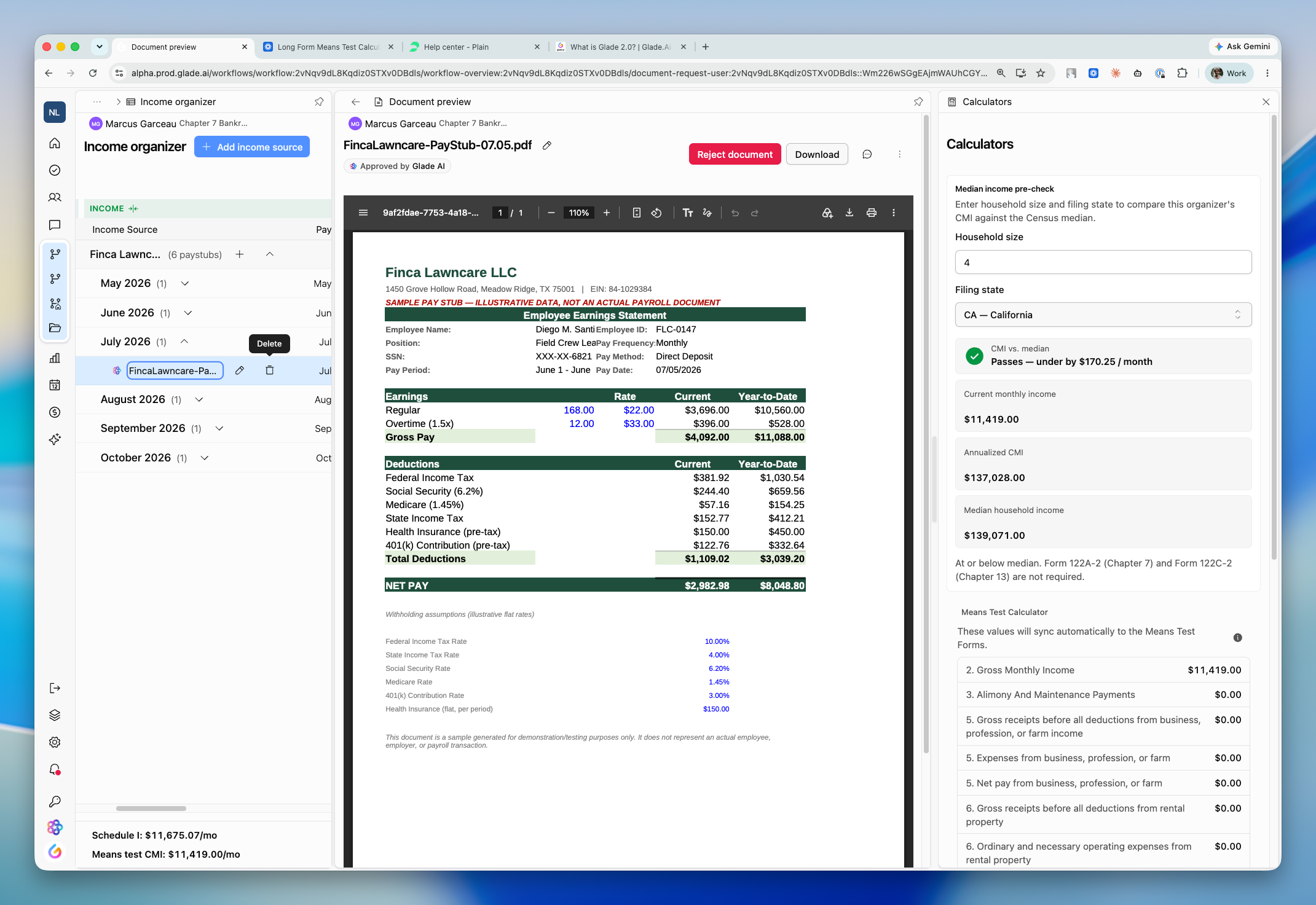
Open the calculators panel and find "Long form means test." In the Income Organizer, switch to Means Test focus mode. Below the existing Schedule I and Means Test calculators, a Long form means test section lists the supported lines — 16–19, 25a–c, the line 25 total, and (for Chapter 13) line 41.
See the values land on the questionnaire. The matching 122A-2 / 122C-2 fields show the pill "Populated from long form means test calculator," so it's clear the number came from the calculator rather than being typed in.
Review, complete, and confirm. Fill in the lines Glade can't source from a paystub, then confirm the totals.
What Glade fills from paystubs
Pulled with high confidence:
Line 16 — Taxes (federal, state, local, Social Security, Medicare withholding)
Line 17 — Involuntary deductions (mandatory retirement, union dues, required uniforms, etc.)
Line 19 — Court-ordered payments (child/spousal support and other wage garnishments)
Line 25a — Health insurance, 25b — Disability insurance, 25c — Health savings account (HSA) — the employee-paid portions
Pulled, but review it:
Line 18 — Term life insurance. A paystub may show
LIFEorVOL LIFEwithout establishing that it's term life insurance, so confirm it qualifies before relying on it.
Not on a paystub — you or the client enter these:
Line 20 — Education, Line 21 — Childcare, Line 22 — Additional health care (excluding insurance), Line 23 — Optional telephone/telecom
The line 25 confirmation ("Do you actually spend this amount?") — this always needs the client's confirmation.
Key details
Amounts are converted to monthly. Paystubs show per-pay-period deductions; Glade normalizes them by pay frequency (for example, biweekly is
amount × 26 ÷ 12), not by simply doubling."Household" is the target. The figures reflect the household total (filing debtor plus non-filing spouse) — that's what the 122A-2 / 122C-2 lines bind to. See the Household section below.
Lines Glade can't source are left blank, not zeroed. A blank line means "not yet provided," so an unsupported line won't be mistaken for a real $0.
Excluded income stays excluded. Social Security and anything marked as not counting toward the means test is left out of the calculation.
Chapter 13 line 41 won't double-count. Mandatory retirement is kept on line 17 only, so disposable income on 122C-2 isn't counted twice.
Re-run it whenever the paystubs change. Add a stub or correct an amount, then recalculate — Glade refreshes the outputs.
Setting the e-filing district template on a case
Before a case can be filed, it needs a district template — the court district's filing configuration (its forms, required-document slots, and whether it files electronically or manually).
Open the case and click the actions (⋯) menu on the case detail view.
Choose "Assign district template."
Search for the district in the dialog ("Search district templates…") and select it — for example, Florida Middle. Each result shows the district name with its district key beneath it.
Click Save. The Electronic Filing Packet then shows a Filing District banner with the district name and whether it's set up for Electronic filing or Manual filing.
Good to know:
It must be set before filing. If it isn't, filing is blocked with "No district template is assigned to this workflow." You can also reach the dialog from the packet's Fix this button.
A suggestion isn't the same as saving. Glade may pre-select a district from the questionnaire and label it "Suggested (not saved)." You still need to click Save to apply it.
You can change or clear it later by reopening the same dialog.
Can't find your district? If the list warns that not all templates loaded, or your district is missing, contact support.
The Household section: what it means and how it's calculated
"Household" comes up in two related places in a bankruptcy case, and both feed the means test.
1. Household size — the number of people in the debtor's household. This is captured on the means test (Form 122A-1, line 13, for Chapter 7; Form 122C-1, line 16b, for Chapter 13; see Household Size on the Means Test) and shown as "Household Size" on the median-income screen. It drives the median family income your client is compared against: household size plus the filing state/county determines which median figure applies, and that comparison is what tells you whether a Chapter 7 client passes the means test, or whether a Chapter 13 client is above or below median.
Because it's a single value that drives the median lookup, an incorrect household size changes which median row is applied — so it's worth confirming.
2. Household income — when a case has more than one earner, Glade aggregates income across the household: the filing debtor plus a non-filing spouse (and a second debtor in a joint case). A non-filing spouse's income is included when calculating Current Monthly Income for the median comparison. This combined household figure is what flows into the long-form means test and binds onto the 122A-2 / 122C-2 lines described above.
Good to know:
Household size and household income are separate. Size drives the median comparison; income is the combined earnings that populate the forms.
A non-filing spouse's income still counts toward Current Monthly Income for the median test, even though the spouse isn't filing.
FAQ
Q: The Long form means test section shows $0.00. Is it broken?
A: The Income Organizer likely hasn't recalculated yet, or the paystubs haven't been collected. Recalculate the organizer and the supported lines will fill in.
Q: Why is line 20 (education) or 21 (childcare) blank?
A: Those amounts don't appear on a paystub, so Glade leaves them for you or the client to enter. Blank means "not yet provided," not $0.
Q: A field says "Populated from long form means test calculator." Can I still edit it?
A: Yes. If you override it, the field keeps its calculator provenance and shows it was manually overridden.
Q: The deduction on the paystub is per paycheck. Does Glade just double it for monthly?
A: No — it converts based on pay frequency (for example, biweekly is × 26 ÷ 12), so semi-monthly and biweekly clients are handled correctly.
Q: I can't file — it says no district template is assigned. What do I do?
A: Open the case's actions menu, choose Assign district template, search for and select the court district, and click Save. Then re-open the Electronic Filing Packet.