
What is a thread in a workflow?
In a Glade workflow, a thread is an alternate path through the workflow — a branch with its own set of steps. Threads let a single case follow several paths that run in parallel or start only when the case calls for them.
Important: A workflow thread is not a message or chat conversation. It has nothing to do with client messaging, discussions, or your inbox. A thread is a branch of the workflow's steps — the tasks and milestones that make up the case.
Overview
Every workflow is built from a workflow template and organizes a case into steps. Some cases don't follow a single straight line — they branch. A thread is one of those branches. Each thread has its own ordered set of steps, and a workflow can have several threads.
There are two kinds of threads:
The main thread — the workflow's primary path. It is always present and always shown. For a bankruptcy case, this is typically the core path (for example, "Chapter 7 Bankruptcy") with the main sequence of steps.
Alternate threads — optional branches that only apply in certain situations, such as "341 Meeting Rescheduled", "Discharge", "Dismissal", "Post Filing", or "E-Signature Requests". Each runs its own steps, either in parallel with the main thread or when a specific case condition is met.
How it works
On a workflow's Steps view:
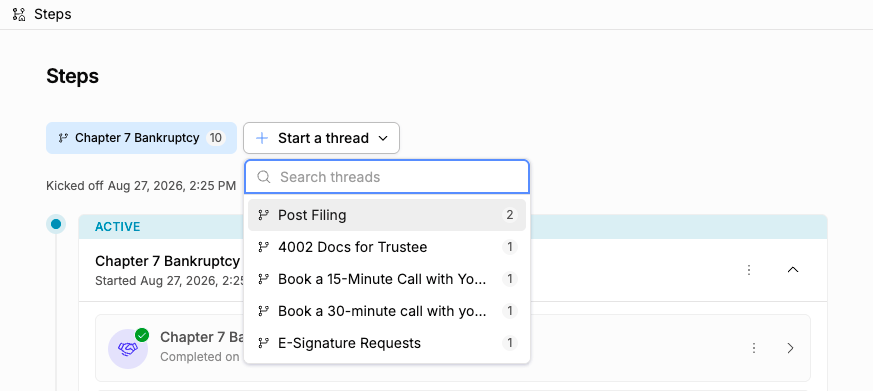
Active threads appear as tabs at the top. The main thread is the first tab, followed by any alternate threads that have already been started. The number on each tab is how many steps that thread contains.
Select a tab to see that thread's steps. Only the selected thread's steps are shown below, so the view stays focused on one path at a time.
Start an alternate thread with the Start a thread button at the end of the tab row. It opens a searchable list of the threads that haven't started yet. Pick one, confirm, and that thread starts — its steps begin and it becomes a new tab you can switch into.
In the workflow editor (where templates are built), the Threads section splits a workflow into these alternate paths: "Split the workflow into alternate paths that run in parallel or based on case conditions. Each thread has its own set of steps."
Key details
A thread is a set of workflow steps — a branch of the case plan. It is not a conversation, a message, or a chat.
The main thread is always active; you never need to start it.
Alternate threads must be started before their steps run. Until then they wait in the "Start a thread" list.
Starting a thread is a deliberate action and asks you to confirm first.
Switching between thread tabs only changes which steps you are viewing — it doesn't start or stop anything.
FAQ
Q: Is a thread the same as a message thread or a chat conversation?
A: No. A workflow thread is a branch of the workflow's steps. It is unrelated to client messaging, discussions, or your inbox. If you're looking for client conversations, those live in the messaging and discussion area, not in Threads.
Q: What's the difference between the main thread and an alternate thread?
A: The main thread is the workflow's primary path and is always shown. Alternate threads are optional branches (like "Discharge" or "341 Meeting Rescheduled") that you start when the case needs them.
Q: How do I start an alternate thread?
A: On the Steps view, click Start a thread at the end of the tab row, search for and pick the thread, and confirm. Its steps begin and it appears as a new tab.
Q: Why don't I see all the threads as tabs?
A: Only started threads appear as tabs. Threads that haven't been started yet are tucked into the "Start a thread" list so the view stays focused on what's actually running.