
How to Pay Your Invoice
You can pay an invoice from your law firm right in your Glade client portal, using a card or your bank account (ACH). If your firm allows it, you can also pay part of the balance now and the rest later.
Before you start
Have your card or bank account details ready.
If the amount or description on the invoice looks wrong, contact your firm before you pay. You can't edit the invoice yourself.
How to pay
1. Open your invoice
Sign in to your client portal. You can also open the link in the invoice email from your firm.
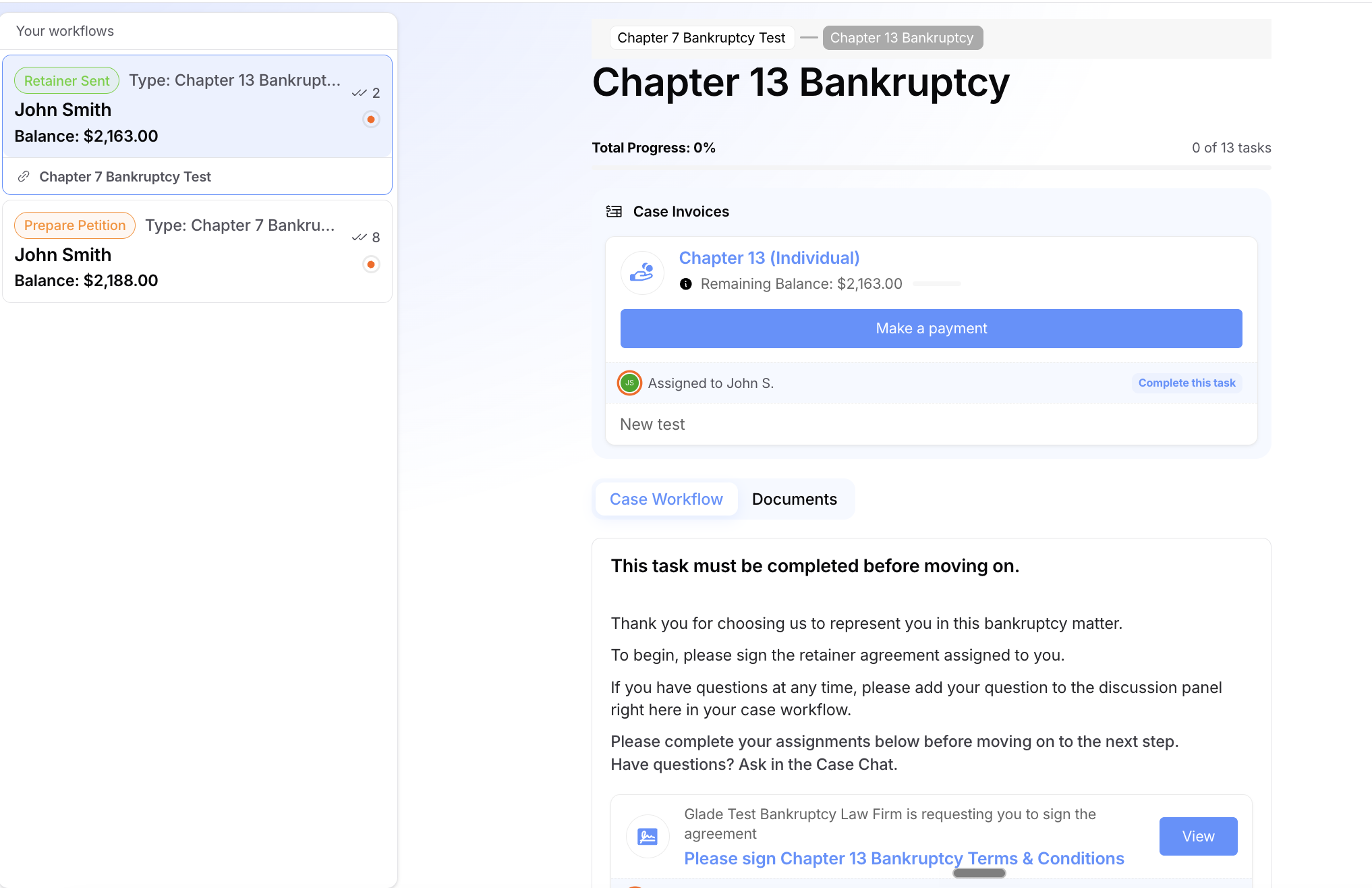
Under Your workflows, select your case.
In Case Invoices, find the invoice and its Remaining Balance.
Select Make a payment.
2. Choose how much to pay
To pay in full, pay the whole remaining balance.
If your firm allows partial payments, you can enter a smaller amount instead. The rest stays on the invoice for later.
If you can't change the amount, your firm requires this invoice to be paid in full.
3. Choose card or bank account
Choose to pay by card or by bank account (ACH). Your firm decides which options you see. Some firms accept only debit cards or bank payments.
Enter your card or bank account details.
Check the total. If your firm adds a processing fee, you'll see it here before you pay.
4. Confirm the payment
Double-check the amount, payment method and total.
Select the pay button to submit your payment.
Stay on the page until you see that your payment went through.
After you pay
Your balance updates. Bank (ACH) payments can show as pending until your bank clears them.
You'll get an email. Bank payments may first send an email saying your payment has started. A partial payment sends a partial payment email. When the invoice is paid in full, Glade emails you a receipt. Keep it for your records.
If a payment fails, check your card or bank details and try again, or contact your firm.
Payment plans
Some firms let you pay over time with a payment plan, which charges you automatically on a schedule until the invoice is paid. This is different from making a one-time partial payment. If your firm offers plans, you may see an option on the invoice to set one up. You can also ask your firm to set one up for you.
FAQ
Q: Can I pay with a credit card?
A: Yes, if your firm accepts credit cards. Some firms accept only debit cards or bank payments. If you don't see the option you want, ask your firm.
Q: Why can't I enter a smaller amount?
A: Your firm has set this invoice to be paid in full. Contact them if you need a different arrangement, such as a payment plan.
Q: I paid, but my balance still looks open.
A: Refresh the page. Bank (ACH) payments can stay pending until your bank clears them. If it still looks wrong, contact your firm with the date and amount you paid.
Q: Where is my receipt?
A: When your invoice is paid in full, Glade emails you a receipt. Check your spam folder if you don't see it.
Still need help?
Contact your law firm with the invoice amount and what you were trying to do. If you can't sign in, see Client Portal — First-Time Access & Login Troubleshooting or Trouble Signing In or Forgot Your Password.