
Changing Filing Status from Joint to Individual (or Individual to Joint)
Updating Marital Status Across Schedules
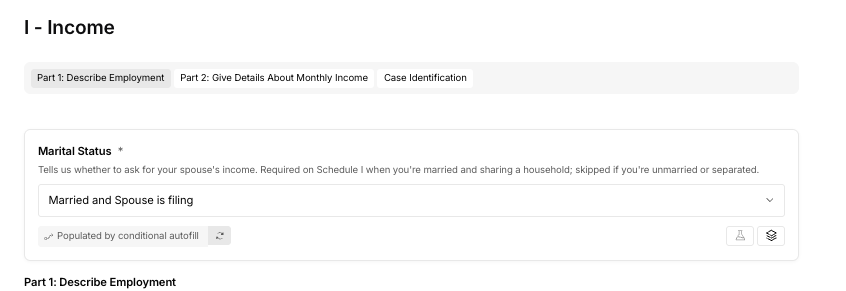
When you need to change a case's marital status from joint to individual (or individual to joint) while working on the schedules, update it at the source. Marital status is entered on Schedule I and Form 107, question 1. Schedule J, question 1 is calculated from those answers and locked, so it updates on its own.
Overview
During case preparation, if the filing status needs to change from joint to individual or vice versa, the marital status appears in multiple schedules and forms. Updating the source fields keeps the case consistent across all calculations and supporting documents.
How It Works
1. Update Schedule I (Current Income of Individual Debtor(s)): Open Schedule I and locate the marital status field. Update it to reflect the new filing status.
2. Update Form 107 (Statement of Financial Affairs), question 1: Open Form 107 and update the marital status in question 1.
3. Confirm Schedule J (Your Expenses): Schedule J, question 1 is locked and fills in from your Schedule I and Form 107 answers. Open Schedule J and confirm it now shows the new status. If it looks wrong, fix Schedule I or Form 107 instead of Schedule J.
4. Confirm the Means Test Form: Marital status on the means test also fills in automatically. Open the means test for your chapter and confirm it updated.
- For Chapter 7 cases: Confirm marital status in Form 122A-1 (Official Form 122A-1)
- For Chapter 13 cases: Confirm marital status in Form 122C-1 (Official Form 122C-1)
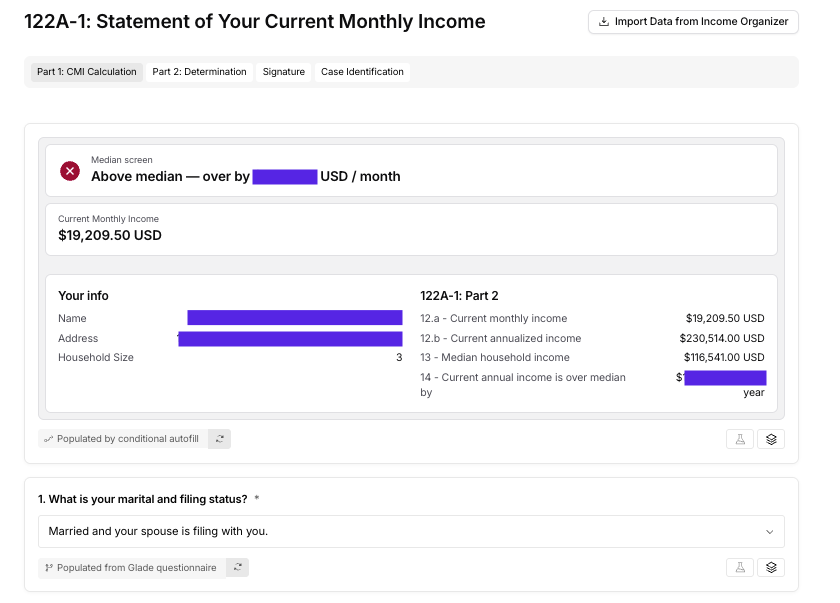
Once the source fields are updated and you've confirmed Schedule J and the means test, your case will reflect the correct marital status throughout.
Key Details
- Edit marital status on Schedule I and Form 107, question 1. Schedule J, question 1 and the means test fill in automatically from those answers.
- Make sure you're working on the correct means test form for your chapter. Chapter 7 uses 122A-1; Chapter 13 uses 122C-1.
- Updating marital status affects income calculations, so verify the income figures are correct after you make the change.
- Finish these updates before the case is ready to file.
FAQ
Q: Where exactly is the marital status field?
A: You enter it near the top of Schedule I and in question 1 of Form 107. Schedule J, question 1 shows the same status but is locked. In the means test forms (122A-1 or 122C-1), it fills in automatically; look for it in the debtor information section to confirm.
Q: Why can't I edit marital status on Schedule J?
A: Schedule J, question 1 is calculated from Schedule I and Form 107 so the forms can't disagree. Update the source answers and Schedule J refreshes. See Marital Status Autofill in the Schedules.
Q: If I only update one place, will there be an error?
A: You may see advisory mismatch findings when preparing to file. Update both source fields so the case is accurate.
Q: What if I'm not sure whether it should be joint or individual?
A: Check with your attorney or the client intake information to confirm the filing status before making changes.